Properties of applications: Application authentication
On the Authentication tab, which is present when you have selected a new or existing application in the Application browser, you specify the login procedure for opening your Collections application. Axiell Collections always opens with a login screen in which a user name and password have to be filled in, unless you use single sign-on. The applicable user credentials can have different origins. See the Help topic: User authentication and access rights, for more information about access rights.
Click here for information on how to edit properties in general. On the current tab you'll find the following settings:
| • | None (typically only allowed for Collections pre-3.0 versions - the inappropriately named "None" option, means that Collections will validate an entered user name and password to user credentials from the local machine or Active Directory. The relevant credentials will then be used too for applying any security policy through access rights and roles. Users must still be linked to roles, which can be done in the application structure (.pbk). However, for .NET Core version 3.0 of Collections, you typically can't use None and you have to select one of the options below. (An application for which None has been set anyway, may report "Authentication not configured" on the login page and won't allow logging in.) |
| • | Adlib.pbk - store user names, passwords and roles in a Collections .pbk file through user properties editable in Designer. The user names may be different from user names for the general Windows login. Two-factor authentication can be set up for this authentication method.
Users and their roles and any passwords can be created in an application by right-clicking the .pbk file in the Application browser and selecting New > User in the pop-up menu. (Note that you have to register really all users, any AD groups you wish to use as roles and any roles registered in a Users data source of this application as users in the .pbk when you select this authentication method: in the latter two cases, the "user" name and role name are typically identical) |
| • | Adlib database - store user names, passwords, roles (optionally), e-mail adresses and application ids (optionally) in one of your Collections databases. You'll probably have to adjust your application (by creating new fields in a table like people.inf or by including a ready-made users database table) to make it possible to enter this information in the database. You'll then have to fill in the other options on the current properties tab. Choose the Database to which you have added the fields, by clicking the … button. The path will then be filled in automatically in the Folder property. If necessary you can also choose the proper dataset. Also select the data dictionary fields that you've created for the user name, password, e-mail and possibly role, in the User id field, Password field, E-mail field and User role field options (use the … buttons next to them). If you have more than one Collections application and certain users must have different roles in different applications, then you'll have to have/add another field to your user data, namely an application id field. Every application must have been assigned its own unique application id which can be referenced in the Application id field property. By grouping your new user role and application id fields in the data dictionary and making this group repeatable on the screen, you allow for the possibility of each user having a different role in every application. For each user a record must then be created that at least holds information in the user name and password fields.The user names may be different from user names for the general Windows login, but user names need to be unique. The Change password and I forgot my password functionality as well as two-factor authentication can be set up for this authentication method. From Collections 3.0, roles registered in the Users database table, must be registered as user names with a role with the same name in the .pbk too, otherwise Collections doesn't know about them and you also can't assign this role any access rights to Collections application objects. |
| • | Active directory - store user names, passwords and possibly e-mail addresses in Active directory user accounts. Users must still be linked to roles for applying any security policy in Collections itself, which can be done in the application structure (.pbk). The Change password and I forgot my password functionality as well as two-factor authentication can be set up for this authentication method. Note that AD groups must be registered as user names with a role with the same name in the .pbk too, otherwise you can't assign AD groups any access rights to Collections application objects. It is not mandatory that the role has the same name as the "user", but it makes keeping track of roles easier of course. |
| • | HTTP - this option cannot be used in Axiell Collections. |
| • | Single SignOn - using the user authentication services of an external so-called identity provider like Azure Active Directory, Collections applications can be set up for single sign-on functionality. After a proper setup, this option allows the user to log into Collections without login dialog if he or she is already logged into a different online application in that browser using the same identity provider. The use of external authentication services is not included in your Axiell license and setup of this functionality is complex, so please consult the Axiell ALM Sales department for more information. |
See: User authentication and access rights, for more information about authentication methods.
Only if you've selected the Authentication method: Adlib database, this property must contain the full path to the database you want to link to, without the name of the file. You don't have to fill in this property manually: just select a database in the next option, and the path to that folder is automatically entered here.
First, enter or search for the name of the existing database table (an .inf file name) that holds all the user names and passwords (only for the Authentication method: Adlib database). Do not enter the extension of the file. An example of such a database name is PEOPLE.
If the database that you select has datasets defined for it, these datasets will be listed in the Dataset drop-down list. (Some databases may not have datasets.) Selecting a dataset is optional, you can also just link to an entire database. Typically, you select a dataset if for this link you only want to retrieve data from that specific dataset.
In the above chosen database table (only for the Authentication method: Adlib database), select the (existing) data dictionary field that holds all user names.
See: User authentication and access rights, for more information.
In the above chosen database table (only for the Authentication method: Adlib database), select the (existing) data dictionary field that holds all passwords.
See: User authentication and access rights, for more information.
In the above chosen database table (only for the Authentication method: Adlib database), select the (existing) data dictionary field that holds all user roles.
See: User authentication and access rights, for more information.
In the above chosen database table (only for the Authentication method: Adlib database), select the (existing) data dictionary field that holds all application ids.
An application id field is only necessary if users must have different roles in different applications. The user role and application id fields must then be grouped and be repeatable.
See: User authentication and access rights, for more information.
If you are using the Adlib database authentication method, then for the password resetting functionality (the I forgot my password option in the Collections login screen) and/or two-factor authentication (via e-mail) in Axiell Collections to be functional, an e-mail field is needed in the above specified authentication database table to store the e-mail address of the user to whom a password reset or authentication e-mail must be sent.
For the Active directory method, e-mail addresses of users need to have been specified in their Active Directory accounts: per account only one e-mail address can be used, so authentication by Active Directory groups might not be a good idea.
From Collections 3.0, e-mail configuration (like the e-mail server and the sender e-mail address to use) for both methods above needs to be done in the Collections settings.json file: the SMTP settings at the bottom of the current properties tab are no longer used for Collections e-mailing, they can still be used by other Axiell products though. See the Collections installation guide for more information.
This option was intended for future password resetting or two-factor authentication via Mobile app or SMS, but this won't be imlemented here.
This option is only relevant to the HTTP authentication method which is not supported by Axiell Collections.
From 3.0, two-factor authentication functionality (aka MFA - Multi-Factor Authentication) in Axiell Collections can be set up and enabled completely in the Collections settings.json file, but you can also still enable it here instead if you want (but not configure it). E-mail is the only option you can use here: Mobile App and SMS are not functional. Leave the Provider to None (and don't configure MFA in the Collections settings.json file either), if you don't want to switch this functionality on. See the Collections installation guide for more information.
In an enterprise environment where different Collections applications cannot be allowed direct access to Active Directory, a separate authentication service with its own access to Active Directory is recommended: password reset requests from the normal Collections applications will then be passed on to this authentication service.
If you'd like to use an authentication service (a separate Collections installation on the local network for example, solely used as an authentication service, or a third-party authentication service) for the password resetting functionality and two-factor authentication in Axiell Collections, you can specify it here. Also set the Provider option to E-mail.
An authentication service for two-factor authentication can be used with either the Adlib.pbk, Adlib database or Active Directory authentication method.
An authentication service for password resetting can be used with either the Adlib database or Active Directory authentication method.
You can leave this option empty to let the current Collections installation handle the authentication.
Leave the Authentication server option empty to use the current Collections instance for authentication or enter the URL to a separate Collections application.
For a separate authentication server, just install another Collections application similar to the ones you already have. Then please see the Collections installation guide for information about configuring two-factor authentication and/or password changing/resetting functionality on the Collections IIS application side.
For two-factor authentication you need to provide the URL to your new Collections authentication application as the Authentication server in the adlib.pbk, for example:
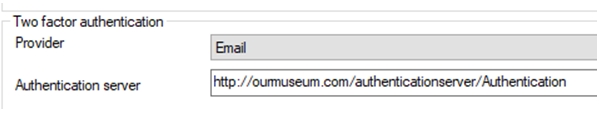
So the IIS application name must be followed by /Authentication (the controller name).
The settings.xml file of a Collections authentication server (if it is a separate Collections instance for this purpose only) must be changed to resemble the following:
<?xml version="1.0" encoding=”utf-8” ?>
<Settings xmlns:xsd="http://www.w3.org/2001/XMLSchema"
xmlns:xsi="http://www.w3.org/2001/XMLSchema-instance">
<Configuration>
< Setting Key="BasePath" Value="\\ourserver\axiell\model 4.5" />
</Configuration>
</Settings>
In which the base path Value must be changed to the UNC path under which your regular Collections applications have been installed.
Enter the name of your SMTP server to be used for sending e-mails from Axiell products other than Collections, still using this .pbk, and also fill in the Port number (typically 25, but your system administrator will know for sure) and the desired Sender email address. From Collections 3.0, e-mail configuration (like the e-mail server and the sender e-mail address to use) for sending e-mails for two-factor authentication, password changing/resetting functionality, and SDI functionality through a scheduled Collections instance (not the deprecated sdi.exe), needs to be done in the Collections settings.json file: the SMTP settings here at the bottom of the current properties tab are no longer used for Collections e-mailing, they can still be used by other Axiell products though.
If you provided an SMTP Server above, then also fill in the Port number (typically 25, but your system administrator will know for sure). Enter the port number of your SMTP server to be used for sending e-mails from Axiell products other than Collections, still using this .pbk. From Collections 3.0, e-mail configuration (like the e-mail server and the sender e-mail address to use) for sending e-mails for two-factor authentication, password changing/resetting functionality, and SDI functionality through a scheduled Collections instance (not the deprecated sdi.exe), needs to be done in the Collections settings.json file: the SMTP settings here at the bottom of the current properties tab are no longer used for Collections e-mailing, they can still be used by other Axiell products though.
Mark this option (available from 1.13.1.6603) to have the SMTP client (Collections) create a TLS/SSL connection to the SMTP server, to enable secure connections for e-mails sent through SMTP. This setting is compatible with Collections 1.19 and up.
Since the connection needs to be authenticated via user credentials (user name and password) other than the IIS application pool identity credentials, you'll have to use a so-called secrets store to securely store these credentials (or other sensitive information) in, for Collections to use when a connection must be made for the currently logged-in user. Click here for the full topic.
From Collections 3.0, e-mail configuration (like the e-mail server and the sender e-mail address to use) for sending e-mails for two-factor authentication, password changing/resetting functionality, and SDI functionality through a scheduled Collections instance (not the deprecated sdi.exe), needs to be done in the Collections settings.json file: the SMTP settings here at the bottom of the current properties tab are no longer used for Collections e-mailing, they can still be used by other Axiell products though.
If you provided an SMTP Server above, then also fill in the desired Sender email address. Enter the sender e-mail address to be used for sending e-mails from Axiell products other than Collections still using this .pbk. From Collections 3.0, e-mail configuration (like the e-mail server and the sender e-mail address to use) for sending e-mails for two-factor authentication, password changing/resetting functionality, and SDI functionality through a scheduled Collections instance (not the deprecated sdi.exe), needs to be done in the Collections settings.json file: the SMTP settings here at the bottom of the current properties tab are no longer used for Collections e-mailing, they can still be used by other Axiell products though.
 Feedback