Field properties per dataset (aka "include" fields)
From Axiell Designer 7.3.15038.1, functionality is available allowing you to override some specific properties of fields per dataset of a database, giving you the possibility to specify a different field name per dataset for one and the same field tag, or to specify different access rights for the field per dataset, a different link domain, (internal) link scope, help key or different enumeration values, for example.
Not all properties can be overridden though. The Inheritable option cannot be set differently from the main field definition: a field is inheritable for all datasets or for none. And if you apply indexed link properties to a field which is overridden by a different field definition for the same field tag in one or more datasets of the current .inf, then make sure you apply the same indexed link properties to those “include” fields (and vice versa): the global field definition and its derivative “include” fields are not allowed to differ where it comes to indexed link properties.
This functionality follows from a requirement for compliancy with the CEN 15907 metadata standard (as used by film archives) and the FRBR (Functional Requirements for Bibliographic Records) standard.
In Collections, fields have always been specified for a specific database table as a whole. For example: in the 5.1 collect.inf database table definition, which contains all dataset, index and field definitions for museum, archive and library object records, you can find the field definition for object_number (tag IN), amongst others. Its field name and other properties would always apply to all datasets within that database table (recall that datasets are actually just partial record number ranges of the database table, created to separate similar records by record type or branch). With the implementation of this functionality this is still the case, but if you want you can now "include" one of the existing data dictionary fields in one or more dataset specifications within the database table definition and override some properties with a different value which will then only apply when the field is accessed from within a data source associated with that particular dataset* in a live Collections application, while the original, master field properties will still apply to any other datasets in which the field has not been included or in which the field has been included indeed but has not received any new settings. The moment you actually include an existing field in a dataset, a copy of the original field definition is placed underneath the Fields node underneath the selected dataset node in the current database table definition, where you can change the available "overloadable" properties as you wish. Note that greyed out properties can never be overridden and autonumbering fields always have a database-wide counter and will share properties across datasets.
URI type fields can also be included in datasets of the .inf. This would come in handy if the dataset names from the .inf do not match the dataset names in URLs used by the web service (e.g. AIS) to display records. For example, in model 5.1, collect.inf has a dataset document. Now suppose the dataset name used by AIS to display records is not document but library. Then you could include the 3P tag in the document dataset and change the Initial value format to e.g. https://ourmuseum.adlibhosting.com/ais/Details/library/%priref%. You could then do something similar for the other datasets.
To include an existing field in a dataset, do the following:
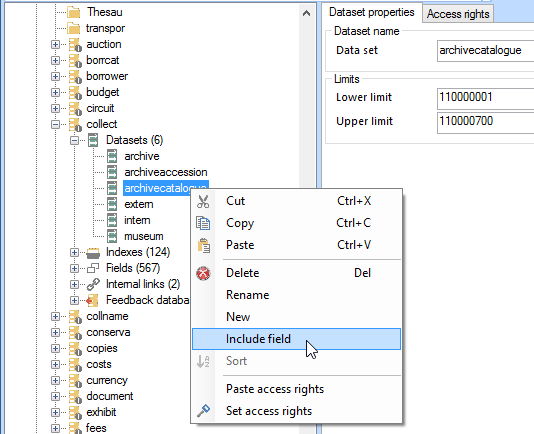
| 1. | Right-click the desired dataset of a database table in the Application browser tree view and select Include field in the pop-up menu.
|
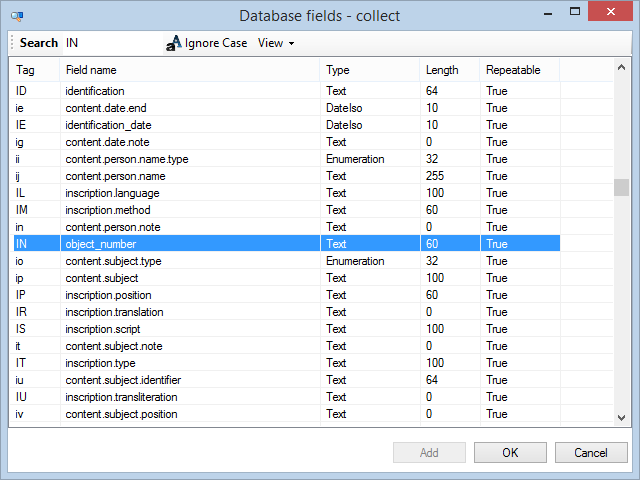
| 2. | Now select an existing field from the data dictionary of the current database table. Note that on dataset level you cannot create new fields: you must always "include" an existing field.
|
| 3. | A copy of the field has now been included in the relevant dataset. Select the field underneath the dataset to change any of the available properties. The new properties will only be valid in this dataset, they won't be copied to the database table definition of the field nor to other copies of the field. Even though the dataset level field definition starts of as a copy and the field tag must remain the same, it'll live its own life from now on. Changes to the field on database level won't affect any copies in datasets. The exception to the rule maybe, is when you delete a field definition: when you do that on dataset level, the original database table level version will remain as is, while if you delete a field definition on database table level then that will be removed along with any of its derived field definitions in the datasets.
In the screenshot below you can see how the IN tag (the object_number field) has been included in the archivecatalogue dataset of collect and how its field name and translations have been changed afterwards. 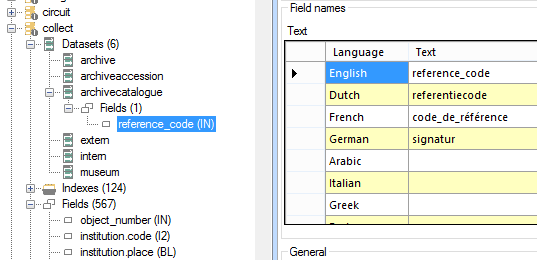
With this particular change you could now use the reference_code field to (advanced) search the Archives (catalogue) dataset in your live Collections application, instead of the object_number field. Other changes to the properties of included fields on dataset level may have a deeper impact or may instead be hardly noticeable to the user. |
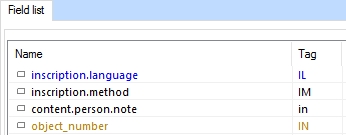
In the database table tree view underneath Fields and in the database Field list view in the Application browser of Axiell Designer 7.4 and higher, fields of which the properties are overridden in at least one dataset are marked with a different colour (call it yellow, ochre, olive or gold) so you'll recognize them at once and know that you should first look up the relevant field definition underneath the relevant dataset since its properties have priority over the field properties on database table level.
* Note that include field definitions are associated with a dataset, not a record number range. This is relevant because include field definitions are only used by Collections when a record is accessed via a data source that routes specifically to that dataset. When the record is accessed via a data source that routes to the database table as a whole, the database table-level field definition will used. And for a higher-level dataset with a record number range overlapping that of multiple smaller datasets, you may not even be able to create a useful include field because it'll have to take conflicting requirements into account, so you'll be stuck with a database-level field definition still. Collections does not deduce from the record's priref that the record is part of a dataset, and that the dataset's include field definitions should be used.
This means that any variant settings that are connected to data entry/editing (e.g. link domains, enumerative lists), defined in a dataset's include field will not be used when the record is edited via a data source that is not connected to that dataset, like in a Full catalogue data source for example. This could mean that editing an enumerative field in such a data source, would allow the user to select inappropriate values for the relevant record, or that, when forcing a new linked record, the wrong domain would be associated with that term. To prevent this from happening you could choose to make the higher-level data source read-only or you could make the relevant screen fields on the higher-level data source screens read-only.
 Feedback